Texture Import
The Texture Import helper allows you to load and assign selected images to the material Image Texture Nodes.
Note
Automatic Material Creation uses the same mechanism to assign baked textures to the material, allowing customization.
Helper
You can access this helper in Helpers → Texture Import section of the 🍰PAWSBKR N-Panel
The Batch Import Textures/Import Textures buttons allow you to import images
from the file system and assign them to the selected materials.
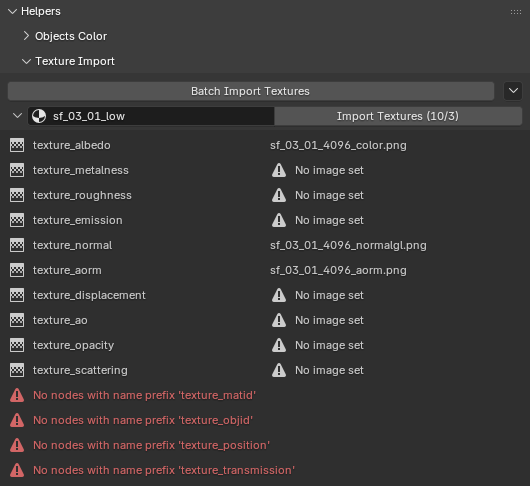
Under the Material panel you can see the Image Texture Nodes that match the rules and the images assigned to them.
How it works
The add-on matches images to Image Texture Nodes by comparing the node name prefix to the image name suffix, per the rules.
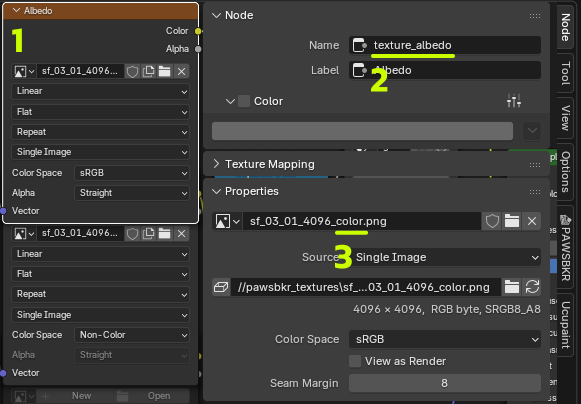
For example, a node (1) with name (2)
texture_albedo matches image sf_03_01_4096_color.png (3)
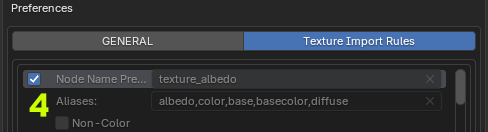
under the default rule (4).
Customization
You can customize this process by disabling default rules and creating new ones.