Automatic Material Creation
This feature allows you to automatically create materials from baked textures and assign them to baked objects.
Global settings
The settings available in the 🍰PAWS: Bakery Settings section of add-on N-Panel and apply to all the Texture Sets in the current Scene.
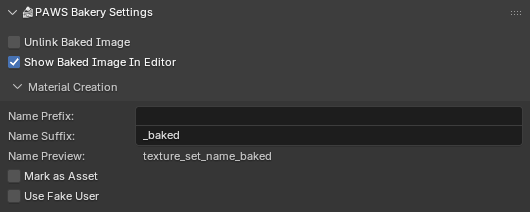
- Material Creation
- Name Prefix
The prefix added to Texture Set name for the created material.
- Name Suffix
The suffix added to Texture Set name for the created material.
- Name Preview
Example of material name.
- Mark as Asset
Mark the created material as Asset.
- Use Fake User
Set
use_fake_useroption for the created material to prevent its deletion.
Texture Set settings
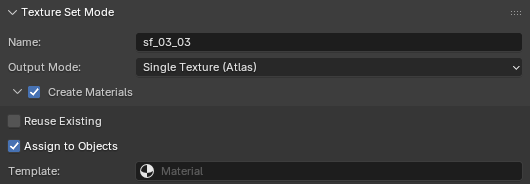
- Create Materials
Create the materials after bake.
- Reuse Existing
Do not (re)create new material, but only try to assign baked images to the existing ones.
- Assign to Objects
Assign the created materials to the baked objects.
- Template
A material to use as a template when creating new materials.
If not set, the add-on will use the bundled material.
See also
Texture Import, for details on how material image nodes map to textures