High to Low Baking
Simple Mode
In Simple Mode high-to-low poly baking works the same as vanila Blender.
Set the desired texture Bake Settings.
Toggle on the
Selected to Activecheckbox in the Simple Mode Panel.Select the objects in 3D Viewport. low object must be active (selected last).
Click the
BAKE SELECTEDbutton.
See also
Texture Set Mode
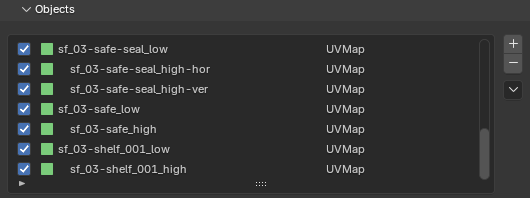
In Texture Set Mode, objects are matched using _high/_low name suffixes.
When matching, everything after the _high suffix in the name is omitted,
allowing baking many high objects into one low.
For example, objects set up as shown in the image below would result in 3 low objects.