Get Started
Installation
Available on Blender Extensions and GitHub Releases.
Supported versions
Developed and tested for Blender 4.2+.
Before you start
The add-on automates material setup for texture baking and provides batch baking workflow for processing a set of textures and objects at once.
To better understand what you can achieve, you may need to familiarize yourself with the baking process in vanilla Blender.
Most controls appear in the 3D Viewport 🍰PAWSBKR N-Panel.
Operation modes
The add-on operates in two modes.
Simple
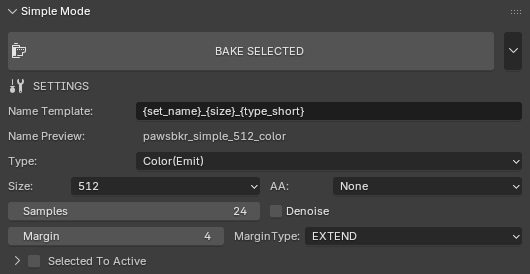
Simple Mode allows you to bake selected in 3D Viewport objects to a single image.
This mode is useful for one-time operations and quick testing.
See also
Bake Settings, for a description of the available settings.
Note
Currently baking only works with Principled BSDF Shader. Doesn’t suit your needs? Let me know!
Texture Set
Texture Set mode allows you to specify set of objects and texture types to bake.
This mode is useful for repetitive operations or batch baking a set of objects and textures for export or intermediate bakes.
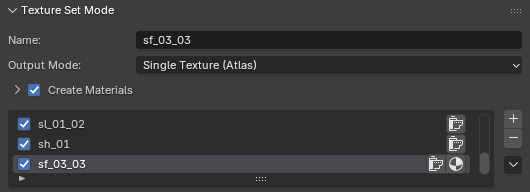
In this section you can manage Texture Sets, their associated settings, and run bake of all textures enabled for the Texture Set.
Settings
- Name
Name of Texture Set
- Output Mode
- Single Texture (Atlas)
Bake all the objects to a single atlas texture.
- Per-Object
Create a separate image for every object in the list.
- Create Materials
Objects
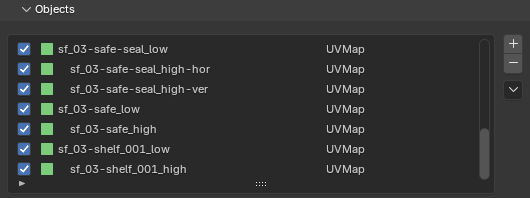
In this section you can manage objects linked to the active Texture Set.
To add objects to the list, select them in the 3D Viewport and click the + button.
You can uncheck a checkbox in the list to temporarily disable object baking.
Textures
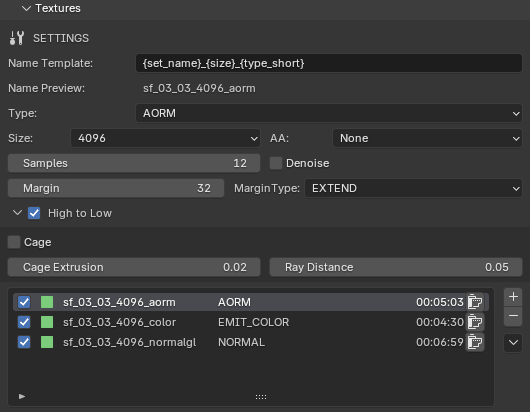
In this section you can manage Textures, their associated settings, and run bake of specific Texture.
See also
Bake Settings, for a description of the available settings.